SVS ELK Log Service Ubuntu Install
本文將分享如何將Elasticsearch、Logstash、Kibana、Filebeat安裝至Ubuntu系統,並自動背景執行。
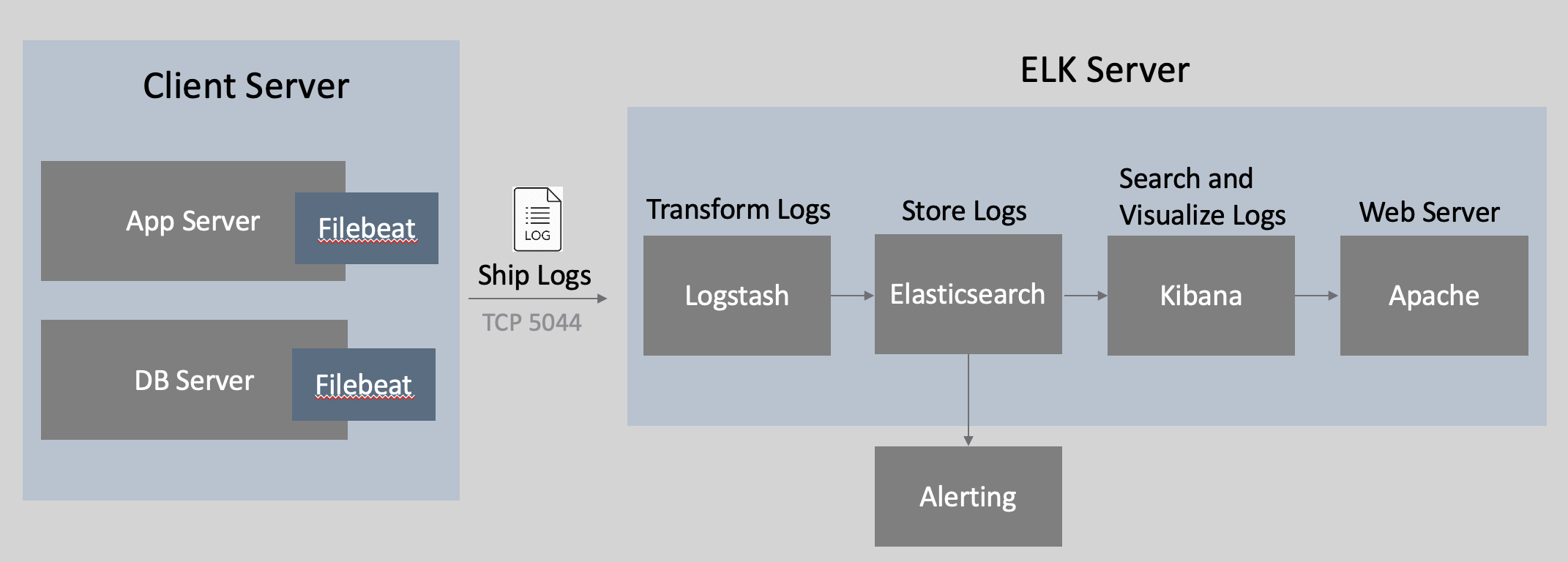
SVS ELK Service on Ubuntu
- Ubuntu 16.04.3 LTS Minimal
- Ubuntu 18.04.1 LTS Minimal
- JDK 1.8.0 or OpenJDK 1.8.0
Elasticsearch on Ubuntu
- 在/var底下新增ELK資料夾
- 在ELK資料夾輸入底下指令會進行下載
1wget https://artifacts.elastic.co/downloads/elasticsearch/elasticsearch-6.5.1.tar.gz
- 下載完畢後進行解壓縮
1tar zxvf elasticsearch-6.5.1.tar.gz
- 重新命名為
1mv elasticsearch-6.5.1 elasticsearch
- 進入elasticsearch/bin,執行以下
1./elasticsearch
- 不要用root去執行./elasticsearch會報錯誤。請新增一個獨立的使用者用來執行ElasticSearch
1Exception in thread "main" java.lang.RuntimeException: don't run elasticsearch as root.
2        at org.elasticsearch.bootstrap.Bootstrap.initializeNatives(Bootstrap.java:93)
3        at org.elasticsearch.bootstrap.Bootstrap.setup(Bootstrap.java:144)
4        at org.elasticsearch.bootstrap.Bootstrap.init(Bootstrap.java:285)
5        at org.elasticsearch.bootstrap.Elasticsearch.main(Elasticsearch.java:35)
6        Refer to the log for complete error details.
- 建立使用者elkuser並切換到elkuser在執行elasticsearch
1useradd elkuser -p 1234
2su elsearch cd elasticsearch/bin ./elasticsearch
Logstash on Ubuntu
- 在ELK資料夾輸入底下指令會進行下載
1wget https://artifacts.elastic.co/downloads/logstash/logstash-6.5.1.tar.gz
- 下載完畢後進行解壓縮
1tar zxvf logstash-6.5.1.tar.gz
- 重新命名為
1mv logstash-6.5.1 logstash
- 在bin資料夾裡建立logstash.conf,相關配置內容請查閱附件logstash.conf,如要設定其他參數可自行定義
- 到logstash/bin資料夾執行logstash
1./logstash -f logstash.conf
Kibana on Ubuntu
- 在ELK目錄輸入底下指令會進行下載
1wget https://artifacts.elastic.co/downloads/kibana/kibana-6.5.1.tar.gz
- 下載完畢後進行解壓縮
1tar zxvf kibana-6.5.1.tar.gz
- 重新命名為
1mv kibana-6.5.1 kibana
- 到kibana/bin執行kibana服務
1./kibana
LogTerm Service on Ubuntu
- 使用supervisor來管理多個程序,執行以下指令:
1sudo apt-get install supervisor -y
- 設置開機啟動
1sudo systemctl enable supervisor
2sudo systemctl start supervisor
- 新增elk.conf,配置內容請查閱附件elk.conf 。
1sudo vim /etc/supervisor/conf.d/elk.conf
- supervisord.conf更動以下內容
1sudo vim /etc/supervisor/supervisord.conf
2
3[include]
4files = /etc/supervisor/conf.d/*.conf
Supervisord 相關指令參數
- 讓ELK相關服務會以 supervisord 子程式的身份運作,以下為supervisor相關指令:
1sudo service supervisor start  //啟動supervisor服務
2sudo service supervisor restart //重新啟動supervisor服務
3sudo service supervisor stop //暫停supervisor服務
- supervisorctl可以控制某一個程序啟動停止操作
1sudo supervisorctl status //查看程序運作狀態
2sudo supervisorctl start all //啟動某個程序
3sudo supervisorctl stop all //停止某個程序
4sudo supervisorctl restart all //重啟某個程序
5sudo supervisorctl update all //根據最新的設定檔,啟動新配置或有改動的程序,配置沒有改動的程序不會受影響而重啟
6sudo supervisorctl reload //載入最新的設定檔,停止原有程序並按新的配置啟動
FileBeat on Ubuntu安裝
- 在ELK目錄輸入底下指令會進行下載
1wget https://artifacts.elastic.co/downloads/beats/filebeat/filebeat-6.1.1-linux-x86_64.tar.gz
- 下載完畢後進行解壓縮
1tar zxvf filebeat-6.1.1-linux-x86_64.tar.gz
- 重新命名為
1mv filebeat-6.1.1-linux-x86_64 filebeat
- 在filebeat下新增logs資料夾
- 打開/var/ELK/filebeat/filebeat.yml進行相關配置,請查看附件內容
- 運作filebeat
1nohup ./filebeat